ChemOffice + E-Cloud

In January 2023, a new version of ChemOffice + Cloud for Windows was released (version 22.2). For Mac, there is a ChemOffice Professional installer, also in version 22.2.
You can read about the new features here:
https://revvitysignals.com/products/research/chemdraw
You can keep older versions, but it is not recommended to have anything installed less than ver. 20. Versions earlier than 17 are no longer supported.
Download is possible via the login page:
UPDATED LINK: https://revvitysignals.flexnetoperations.com/
When you have registered a new user or logged in as an existing one, download of the program will be possible.
- NOTE: If you do not receive an email when choosing 'New User – Sign Up' or 'Forgot Password', check the spam folder to see if a mail has ended up there.
Then you should use this page:
https://connect.revvitysignals.com/sitesubscription/
Here you can search for an institution and when entering Aarhus you will find Aarhus University.
Registration
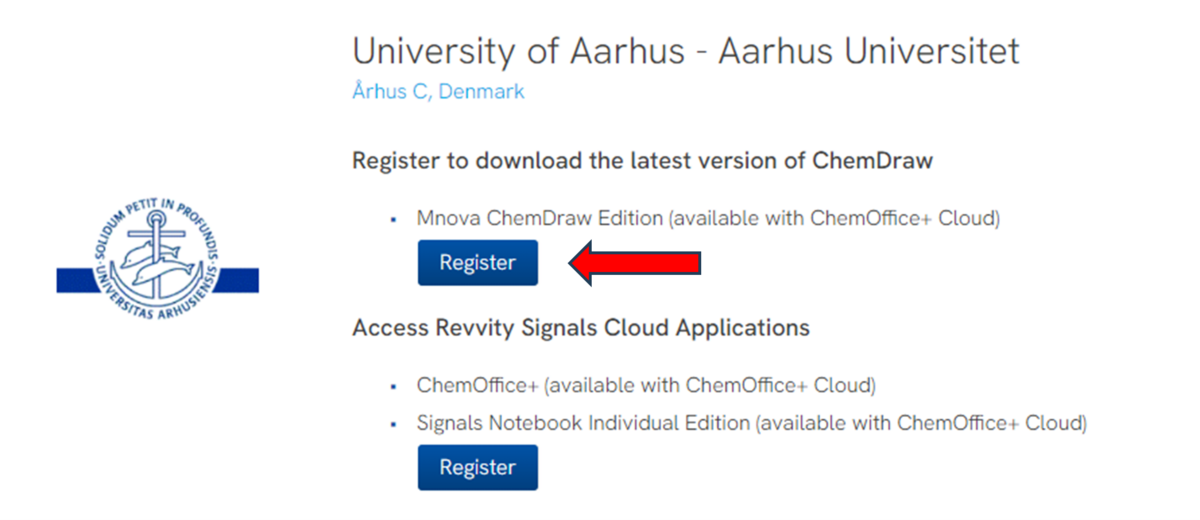
Click the 'Register' button and fill in your information. Once you have clicked 'Submit', you will receive an email with a confirmation and further instructions for installing the program.
For registration, you must use an email address under one of the following domains:
- @chem.au.dk
- @bce.au.dk
- @inano.au.dk
- @mbg.au.dk
- @post.au.dk (students)
Download
Be aware that it may take a bit of time to download and install the software.
Download is possible via the login page.

As indicated on the web sides, it will be no longer possible from March 25 to download the installation software via the Revvity side (due to some license and branding issues).
You don’t have to store anything local.
AU IT and Thomas are working on a download-option via the software portal here: https://software.au.dk/
Problems?
In case of any other problems, please contact Thomas Breitenbach by mail breitenbach@chem.au.dk
A pdf help file for installation/registration can be found her:
https://chem.au.dk/fileadmin/www.chem.au.dk/Vejledninger/ChemDrawGuide2024-english.pdf